REVIEW · LONDON
Londra Audioguide – TravelMate app for your smartphone
Book on GetYourGuide →Operated by MyWoWo Srl · Bookable on GetYourGuide
London feels lighter with your own audio guide. I love the no paper tickets approach and the fact that you can use offline listening so your day does not depend on signal. My one caution: the purchase and activation step can be a little fiddly if the code does not appear where you expect.
Once you’re in, the app is built for real sightseeing pace. You get 70 audio tracks totaling 215 minutes, with narration created by professional authors and interpreted by TV and radio talent, and offered in seven languages. The setup is mostly on you, though, so plan a few minutes before you start walking.
In This Review
- Key things I like about the Londra TravelMate audioguide
- How the TravelMate audio guide fits into a real London day
- Getting set up: download, activation code, and where you start
- Download the app
- Find your activation code
- Using offline audio (and why it matters in London)
- Choosing your route: the guide’s 70 stops in practical groupings
- Westminster and the city’s ceremonial heart
- Royal London: palaces, royals-adjacent culture, and classic landmarks
- Museums and art: British Museum, National Gallery, Tate Britain, Tate Modern, V&A
- Neighborhood London: Notting Hill and London’s street-energy spots
- Icons by water and stone: Tower Bridge and Tower of London
- Other major stops the app covers
- What I’d do with 215 minutes of audio (so it doesn’t feel rushed)
- The quiz section: quick learning without turning your trip into homework
- Languages, text readouts, and wheelchair access
- Value and pricing: is $5.63 a good deal?
- So, should you book the Londra Audioguide TravelMate app?
- FAQ
- Is there a meeting point for the Londra Audioguide?
- How do I download the TravelMate app?
- Where do I find my activation code?
- Can I listen offline?
- What language options are available?
- Does the guide include anything besides audio?
Key things I like about the Londra TravelMate audioguide

- Start anywhere, no meeting point: download, activate, and go.
- 70 audio tracks (215 minutes): enough to cover major icons without rushing.
- Online or offline audio: keep listening even if data is spotty.
- Text view included: read alongside the audio when you want.
- Built-in quiz section: short questions that help you remember what you heard.
- Valid for 1095 days: you can reuse the guide as often as you like for years.
How the TravelMate audio guide fits into a real London day

This isn’t a bus tour with a tight schedule. It’s a smartphone audioguide that lets you run your day your way: one museum stop, one royal landmark, a long riverside stroll—then back to audio whenever you feel like it.
What makes this practical is the autonomy. You do not wait for a guide, you do not collect paper tickets, and you do not have to coordinate with a group. If you’re the type who likes to wander, pause for photos, or duck into a café when the weather turns, this style works well.
Also, the “guide” is not only spoken audio. You can read the text of the audio files inside the app. I like that option because it gives you a quick mental anchor when you’re standing in front of something big and you want to catch the details without rewinding.
You can also read our reviews of more tours and experiences in London



Getting set up: download, activation code, and where you start

There’s no meeting point. Your “start” is your phone. That’s great for flexibility, but you’ll want to do the prep before you’re far from Wi‑Fi.
Download the app
- For Android: go to the Play Store and download the app called TRAVELMATE.
- For iOS: go to the App Store and download the app called TRAVELMATE TM.
Find your activation code
Your activation code comes in your email. Open the activity details (sometimes shown as Show activity details or Show your tickets here), then look for the barcode in the orange frame. Tap it, and you’ll see a barcode view. The activation code is the 10-digit number just under that barcode.
If you use the GetYourGuide app, you can also find the code there: open Show ticket in the App, tap the big barcode in the orange frame, and then read the 10-digit number underneath.
This is the one place where things can go wrong. The feedback overall shows a pattern: people feel the app is well made, but some struggle with purchase or code display. If that happens to you, do not panic—double-check you’re looking at the right email view or the right ticket view in the GetYourGuide app.
Using offline audio (and why it matters in London)
TravelMate lets you listen online or offline. That’s not a tiny feature. London can be chaotic with data, and even if you have reception, it can fluctuate right when you want smooth audio.
Here’s how to think about it: offline audio makes your route feel stable. You can keep moving through areas where your phone might struggle to stay connected. And because the guide doesn’t expire until long after your trip, you can plan one “download day” for future re-walks too.
Earphones are recommended for a better listening experience. For me, that’s a big deal in a city like London, where landmarks attract crowds and audio can compete with street noise.






Choosing your route: the guide’s 70 stops in practical groupings

The app covers a mix of grand sights, major museums, neighborhoods, and even parts of how you get around (the Tube is included as a topic). Since the guide is audio on demand, you don’t need to do everything in one go.
You can build a day around clusters like these:
Westminster and the city’s ceremonial heart
You’ll have audio for:
- Houses of Parliament
- Westminster Abbey
- Trafalgar Square
- St. Paul’s
This grouping makes sense because these places are tied together visually and historically. Walking between them also gives you a natural “story path”—you hear context, then see the next landmark in sequence. If you like architecture and the big public face of London, this is the portion of the guide you’ll probably replay most.
One small consideration: these are major icons, so you may spend time simply getting your bearings in busy spaces. The audio helps, but it won’t magically thin crowds. Use the guide to slow you down and make sense of what you’re seeing, not to rush through.
Royal London: palaces, royals-adjacent culture, and classic landmarks
The guide includes:
- Buckingham Palace
- Harrods
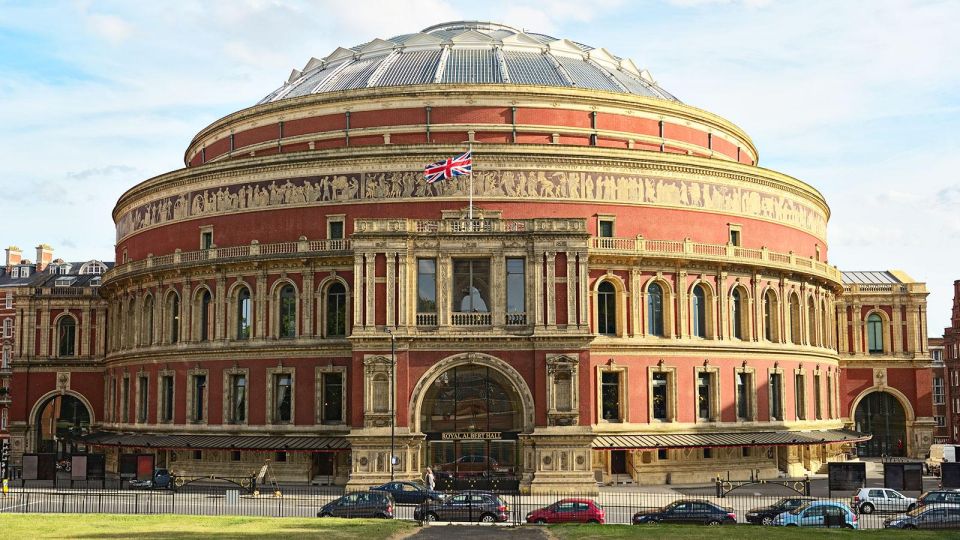
- Royal Albert Hall
If you’ve ever felt like royal sites are just photo stops, the audio format can change that. You get a guided sense of what you’re looking at—what it is, and why London treats it like a centerpiece.
Harrods and Royal Albert Hall can be especially useful because they aren’t just “one building.” They’re part of the way the city markets itself: shopping glamour on one hand, concert-hall gravitas on the other. Even if you only peek inside (if/when entrances are open), the narration can make the stop feel more intentional.
Museums and art: British Museum, National Gallery, Tate Britain, Tate Modern, V&A
Included:
- British Museum
- National Gallery
- Tate Britain
- Tate Modern
- Victoria & Albert Museum
These stops are perfect for how the app works. You can do a quick taste (one audio track) or commit to a longer museum block. The total audio time is 215 minutes across 70 tracks, so you’re not locked into a single marathon session.
Museums also pair well with the text readout. When you’re taking a break in a gallery room, you can glance at the text for the key points instead of replaying audio in noisy spaces.
Neighborhood London: Notting Hill and London’s street-energy spots
You’ll also find tracks for:
- Notting Hill
- Piccadilly Circus
- Hyde Park
Neighborhood and “street energy” content can be the best way to keep the guide from feeling like a checklist. Notting Hill is a popular name, but the value of audio is that you’re not just staring—you’re learning what people associate with it and how it fits the city’s story.
Piccadilly Circus is the opposite kind of stop: bright, loud, fast-moving. In places like this, I like using the audio selectively. Get the key context, then let the street scene do its thing.
Icons by water and stone: Tower Bridge and Tower of London
Included:
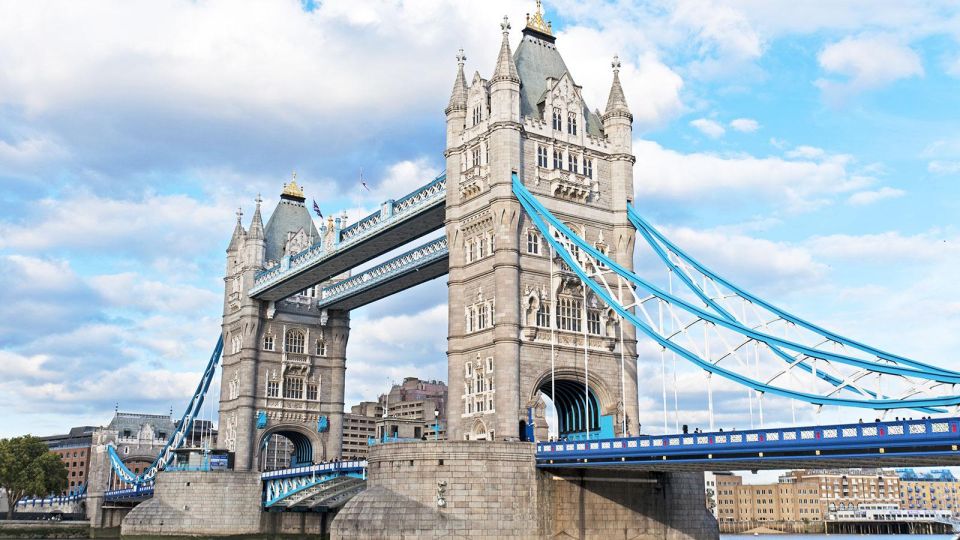
- Tower Bridge
- Tower of London
- London Eye
If you want your London trip to feel “cinematic,” put these in your itinerary. They’re visual proof that the Thames area is built for photos, but the audio adds what’s not visible at first glance.
London Eye is especially good for audio because it naturally works with a slow timeframe. Even without knowing exact ride timing, you can think of it as a moment where narration can match a moving viewpoint.
Other major stops the app covers
There are also tracks for:
- Natural History Museum
- Madame Tussauds
- Soane Museum
- Tate (Britain and Modern, plus the list above)
- Hyde Park
- The Tube
Soane Museum stands out in the list because it sounds different from the more obvious big museums. Madame Tussauds is more of an entertainment landmark, and the Tube content can help you understand what you’re seeing as you navigate stations and lines.
What I’d do with 215 minutes of audio (so it doesn’t feel rushed)
Think of 215 minutes as a library, not a timer. You can treat each audio track as a “chapter,” and pick chapters based on where you are.
If you try to force every stop into one day, it can feel like you’re doing a scavenger hunt. Instead, I’d choose:
- One “big concentration” area (like Westminster + St. Paul’s + Trafalgar Square), and
- One cultural cluster (like British Museum or one of the Tate/V&A stops), and
- One iconic viewpoint or landmark (Tower Bridge or London Eye).
The goal is not to finish. The goal is to walk away feeling like London made sense.
The quiz section: quick learning without turning your trip into homework

TravelMate includes a quiz section with short questions. I like this kind of feature because it turns “passive listening” into a moment of recall. It’s also useful if you’re traveling with someone who wants something interactive.
Use it when you’re taking a rest—inside a café, on a bench, or while lines move slowly. Even a few questions can help lock in names and details so the audioguide sticks in your memory.
Languages, text readouts, and wheelchair access

The audio is available in:
- Italian
- English
- German
- French
- Chinese
- Russian
- Spanish
You can also read the text of the audio files in the app. That’s helpful if:
- You prefer reading over listening at times, or
- You want to catch a name or detail quickly without replaying.
The activity is listed as wheelchair accessible. Since this is an app-based experience with included audio for specific landmarks, your on-the-ground accessibility still depends on your route and the sites themselves—but the content is intended to be usable.
Value and pricing: is $5.63 a good deal?

At $5.63 per person, the value comes from two things you can actually use:
1) You get a lot of content for one price: 70 audio tracks totaling 215 minutes.
2) It lasts: valid for 1095 days from first activation, and it does not expire during that window.
That means you’re not just buying one trip’s worth of guidance. You can return to the guide later, use it on a future visit, or revisit neighborhoods without paying again.
The other value angle is hygiene and comfort. The app-based approach means you’re using your own smartphone and your own earphones rather than a shared device. That’s a small thing, but it matters.
The main tradeoff is that you’re responsible for the tech working: downloading, activation, and headphones. If your phone battery is weak or your activation code access is confusing, the experience can start slower than a traditional tour.
So, should you book the Londra Audioguide TravelMate app?

Book it if you want:
- Independence: no meeting point, no group pace
- Audio you can use online or offline
- A self-guided route through London’s big icons plus major museums and neighborhoods
- The ability to replay content for years (1095-day validity)
Skip it or reconsider if:
- You hate setup steps and prefer everything arranged for you
- Your phone setup is unreliable (low storage, weak battery, activation-code confusion)
- You’re expecting a live guide, because this is fully audio-on-demand
My take: if you’re comfortable navigating with your phone and you like making your own route, this is a smart, low-cost way to turn London landmarks into something you understand—not just something you photograph.
FAQ
Is there a meeting point for the Londra Audioguide?
No. You download the app, activate it, and start your experience straight away wherever you prefer.
How do I download the TravelMate app?
For Android, download TRAVELMATE from the Play Store. For iOS, download TRAVELMATE TM from the App Store.
Where do I find my activation code?
It’s in your email under the activity details/tickets view. The code is the 10-digit number just under the barcode shown in the orange frame. You can also find it through the GetYourGuide app by opening the ticket in the app.
Can I listen offline?
Yes. The audio guide can be used online or offline.
What language options are available?
The app includes audio in Italian, English, German, French, Chinese, Russian, and Spanish.
Does the guide include anything besides audio?
Yes. There’s a quiz section with short questions, and you may also read the text of the audio files inside the app.