REVIEW · LONDON
London: App-Based Walking Tour with 30 Stops
Book on GetYourGuide →Operated by Trippy Tour Guide · Bookable on GetYourGuide
Phones, not tour groups, rule this London walk. This app-based route strings together 30+ handpicked stops so you can move whenever you want, with audio that explains what you’re seeing as you go. I especially like the self-paced flexibility and the way the walk naturally strings together big skyline moments and street-level London life.
One thing to consider: this is not a guided group walk. You’re the guide, using your phone—so you’ll want a charged smartphone and working headphones, and you need a solid internet connection just to download and start the tour.
In This Review
- Key things to know before you go
- How the Trippy Tour Guide app walk really works
- Price and what you’re actually getting for $14
- From the Thames to Westminster Bridge: London Eye views and Big Ben power
- Trafalgar Square to Leicester Square: pride, people-watching, and show-street energy
- Shaftesbury Avenue to Piccadilly Circus: classic neon, modern crowd flow
- St. Paul’s Cathedral view and the dome moment (entry not included)
- Millennium Bridge to Borough Market: modern engineering meets food fuel
- London Bridge to the Monument to the Great Fire: resilience you can see
- Tower of London to Tower Bridge: royal-era weight and skyline drama
- Headphones, battery, and the small tech details that make or break it
- Languages and audio control: choose your comfort level
- Who this walking tour suits best
- Should you book this London app-based walking tour?
- FAQ
- How long is the London app-based walking tour?
- How much does it cost?
- How many stops are included?
- What’s included in the tour price?
- Are any landmark entry tickets included?
- Do I need headphones?
- Do I need internet to start the tour?
- Can I control the audio as I walk?
- What languages are available?
- Where do I begin the tour?
Key things to know before you go
- 30+ stops, no rush: you can stop, replay, or rewind the audio whenever you want.
- Audio plays automatically: the stories trigger as you move along the route.
- Offline map included: useful once you’ve downloaded the tour.
- Iconic landmarks, but not all entries: St. Paul’s Cathedral is shown, but entry fees are not included.
- Multiple language options: English, German, French, Spanish, Italian, Chinese.
- No in-person guide: customer service support is there, but there’s no person walking with you.
How the Trippy Tour Guide app walk really works

This experience is built around your phone and a walk you control. After you book, you’ll get an email with instructions and credentials to install the app, download the tour, and start it at the correct place. When you arrive, you open the app and launch the tour—then the route starts right away.
The audio commentary is designed to be “hands-off.” Stories play automatically as you go along the route, so you’re not constantly tapping for the next item. You do have control, though: you can start, stop, replay, or rewind the audio. That’s great when you pause for photos, stop to check a street sign, or want to hear a section again because the details matter.
You’ll also get an offline map, which is a big deal in a city where service can be spotty. Still, the tour setup requires a strong internet connection up front. Plan to do the download using Wi‑Fi before you head out, and make sure your phone battery is in decent shape.
Finally, this is offered by Trippy Tour Guide, with customer service support included if something technical goes sideways.
You can also read our reviews of more walking tours in London



Price and what you’re actually getting for $14
At about $14 per person for a 4-hour walk with 30+ stops, this is priced like a “value London” option. The trade-off is clear: you’re not paying for a human guide’s live commentary—you’re paying for a structured route, audio stories, and a map that keeps you oriented.
What you get that’s hard to match at this price:
- A long circuit that hits major sights without booking multiple separate tours
- App-based pacing, so you can slow down for viewpoints (or speed up when you’re ready)
- Offline navigation support once you’ve downloaded
What you might find less satisfying:
- You must be comfortable using your phone while walking
- Since it’s self-guided, you won’t have a live person to answer spontaneous questions
- Indoor entries aren’t included (St. Paul’s Cathedral is called out), so you may still pay separately if you want to go inside
If you like independence and you’re the type who actually reads signs and watches how neighborhoods change, the cost-to-value ratio can feel very fair.
From the Thames to Westminster Bridge: London Eye views and Big Ben power
The route begins with a walk along the Thames—London’s working river and a natural “spine” for the city. The audio is built to help you notice how the river shapes London’s history and layout, not just how it looks from a bridge.
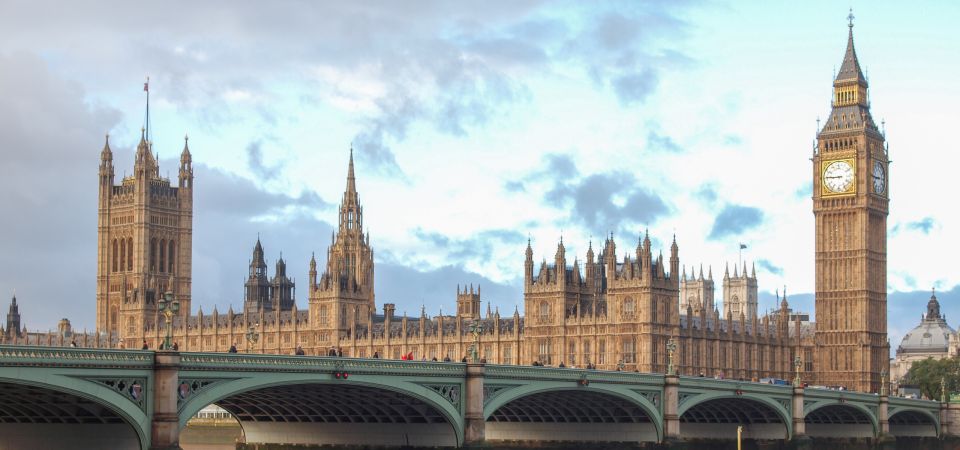
One of the early visual wins is the chance to catch the best view of the London Eye before you move toward the political core. Then the walk shifts into the Westminster Bridge and Big Ben zone, where the audio focuses on the area’s connection to British democracy and power.
This is a strong section for anyone who wants more than postcard framing. Standing near Westminster, it’s easy to feel like you’re just seeing icons. The audio helps you connect those icons to the place they sit in—why this area matters, and how the city’s story concentrates here.
Practical tip: bring water. Even at a self-paced walking pace, “photo stops” add up fast near major landmarks.
Trafalgar Square to Leicester Square: pride, people-watching, and show-street energy

After Westminster, the walk turns toward Trafalgar Square, described as a symbol of national pride. This is also a people-watching stop, so it’s a good place to pause even if you’re not buying anything or entering anywhere. Let the audio run, then take a minute to just watch the square operate—London does squares well.
Next up is Leicester Square, an entertainment center. If you’ve ever seen theater posters and neon marketing in your head, this is where it becomes real. The value here is the shift in tone: you go from official power vibes to a louder, busier stage for modern London.
You don’t have to rush through either stop. With the ability to replay and rewind, you can tailor it to your style—listen while walking, then restart the audio when you’re at the most comfortable viewpoint.
Shaftesbury Avenue to Piccadilly Circus: classic neon, modern crowd flow

Shaftesbury Avenue comes next, guided as a theatrical wonderland. It’s the kind of street where storefronts and signage do half the storytelling, and the audio helps you read what you’re seeing without turning the walk into a lecture.
Then you hit Piccadilly Circus, known for its neon glow. The route even frames it with a comparison to New York’s Times Square—useful if you’ve never been. The point isn’t the comparison itself; it’s the atmosphere. Piccadilly is where London feels like it’s moving at full speed, with crowds, reflections, and constant motion.
A quick strategy: if you want photos without shoulder-to-shoulder frustration, you might prefer coming through with a calmer mindset—this is a “good for seeing it once” area, and also a good place to linger only as long as you enjoy the crowd level.
You can also read our reviews of more tours and experiences in London






St. Paul’s Cathedral view and the dome moment (entry not included)
St. Paul’s Cathedral is part of the route, with the key detail that entry ticket is not included. That matters, because it changes how you should plan your time and expectations.
What you can count on from the tour is the chance to see the cathedral’s presence in the skyline, including that awe-inspiring dome-dominance the route calls out. Even from outside, it’s one of those buildings where your brain keeps going: bigger than you expect, detailed in ways you don’t notice at first glance.
If you want to go inside, you’ll need to arrange your own ticket separately. The tour works either way. If you’re ticket-less, treat this stop as an exterior and viewpoint moment. If you do buy entry, use the app’s replay option to refresh the context so your visit feels more than just a quick look.
Millennium Bridge to Borough Market: modern engineering meets food fuel

From St. Paul’s, the walk crosses the Millennium Bridge. This is presented as a testament to modern engineering. That phrasing is helpful because it tells you what to look for: it’s not only about getting to the next place. It’s about the way the bridge functions as part of the city’s visual line.
Then the route heads to Borough Market, described as a destination for culinary delights. The value here is the blend of “big sight” walking with a practical reset point. This area tends to be where you naturally want a snack, a drink, or even just a break from nonstop landmark viewing.
Even if you don’t buy anything, Borough Market can be a great pause zone because it’s active and sensory. If you do buy, plan for simple things like cashless payment habits and line timing—this is one of those stops where the city’s appetite is part of the show.
London Bridge to the Monument to the Great Fire: resilience you can see
The route then moves to historic London Bridge and the Monument to the Great Fire of London. This part of the walk is about resilience, and it works well because it ties a physical landmark to a real-world event that shaped the city’s rebuilding.
The Monument can be a quick stop for photos or a longer one if you want to stare and take in what it represents. Either way, the audio helps you connect why it’s there—so it’s not just a tall structure in the distance.
This section is also where walking routes can sometimes feel “samey” to people who only care about big-name sights. Here, the audio gives you a reason to care. If you enjoy understanding why things were rebuilt or renamed or placed where they are, you’ll likely get more from this stretch.
Tower of London to Tower Bridge: royal-era weight and skyline drama

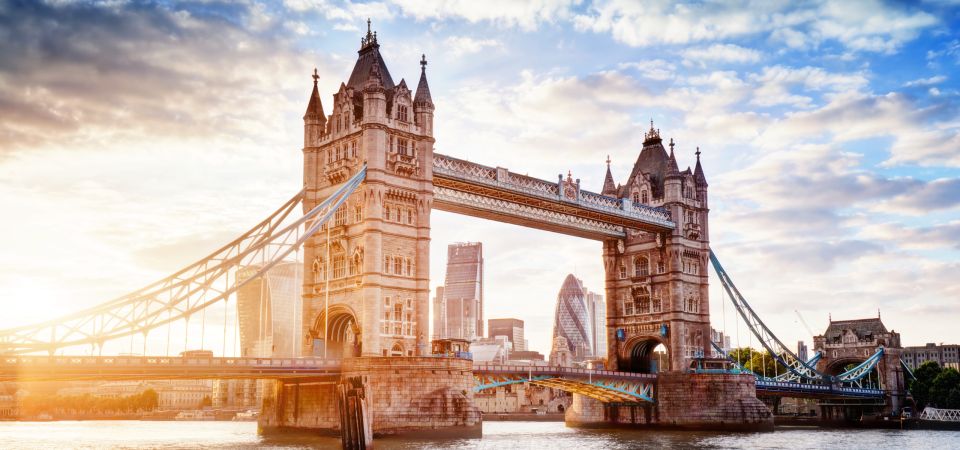
The tour’s finish is a strong one: the Tower of London and Tower Bridge. This is the part where London feels most cinematic—stone history and a dramatic river-crossing view in one sweep.
The Tower of London is presented with royal and medieval past in mind. Even if you don’t enter, the audio context helps you feel the scale and intent of the place. Then Tower Bridge brings you back into the “icon viewing” lane, with big angles and the Thames again as the backdrop.
If your feet are tired at this stage, the app still helps. You can slow down without losing the story, and you can replay the audio near the final landmarks so the last moments feel complete.
Headphones, battery, and the small tech details that make or break it
Because this tour is app-based, the “how to succeed” list is mostly tech.
Bring:
- Water
- Headphones
- A charged smartphone
- Confirmation that you’ve downloaded the app and the tour
Before you start:
- You must install the app and download the tour using Wi‑Fi
- When you arrive, launch the tour on the app so the audio starts automatically as you move
Helpful mindset: treat the phone like a map and storyteller. If you’re the type who likes putting your phone away and wandering, this might feel like a constraint. If you enjoy guided structure without a group pace, it’s a good match.
Languages and audio control: choose your comfort level
The tour offers audio commentary in:
- English
- German
- French
- Spanish
- Italian
- Chinese
So it’s easier to match the audio to your comfort, especially if you’re traveling with friends or family who prefer different languages.
You also have flexible playback controls. The ability to replay or rewind is underrated. It turns the tour from a one-time narration into something you can consult like a walking guide—especially helpful near landmarks where you might stop longer than expected.
Who this walking tour suits best
This tour fits you well if:
- You want a structured route that hits classic London without booking multiple tours
- You like flexibility and don’t want to stay with a group pace
- You’re comfortable using your smartphone for navigation and listening
- You enjoy landmark context—stories that explain what you’re looking at
You might want to think twice if:
- You hate using your phone while walking
- Your battery often dies mid-day
- You prefer a live guide who can answer questions on the spot
- You only care about indoor attractions and don’t want to manage separate entry tickets
Should you book this London app-based walking tour?
I’d book it if you want maximum London icons per minute, but you like doing it at your own pace. The $14 price is hard to beat for a 4-hour route with 30+ stops, audio in multiple languages, and offline map support.
Skip it if you need a human guide, or if tech reliability is a big concern for you. This tour’s success is mostly about your setup: downloaded app, charged phone, and headphones.
If you want a simple rule: bring your basics, download on Wi‑Fi, and plan to enjoy the walk as much as the sights.
FAQ
How long is the London app-based walking tour?
The tour duration is 4 hours.
How much does it cost?
The price is $14 per person.
How many stops are included?
The route includes 30 spots and more than 30 handpicked stops.
What’s included in the tour price?
You get the app-based tour, audio commentary, an offline map, and access to customer service support.
Are any landmark entry tickets included?
Entry fees are not included. St. Paul’s Cathedral is specifically noted as not including an entry ticket.
Do I need headphones?
Yes, headphones are listed as something to bring.
Do I need internet to start the tour?
You need a strong internet connection for the steps to access and download the tour. You must download the tour using Wi‑Fi.
Can I control the audio as I walk?
Yes. Stories play automatically as you go, and you can start, stop, replay, or rewind the audio.
What languages are available?
Audio commentary is available in English, German, French, Spanish, Italian, and Chinese.
Where do I begin the tour?
Check your email for instructions and credentials to access and download the tour in the provider app. When you arrive at the starting location, launch the tour in the app.